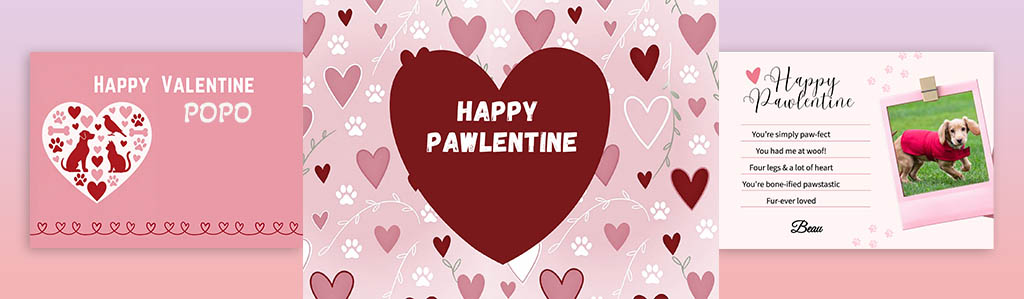
Create a Cute “Pawlentine” Card for the Pets You Care For — in 5 Minutes 🐾💌
Send something personal, professional, and memorable this Valentine’s Day — from you to the pet, via their owner.
These are digital cards you send by email, WhatsApp, or message — no printing, no posting, no awkward Valentines.
These are digital cards you send by email, WhatsApp, or message — no printing, no posting, no awkward Valentines.
Watch a 2-minute demo before you start.
Watch how easy it is to create and personalise a Pawlentine card in just a few clicks.Start Here — Your Free Valentine Card Starter Pack
To create your first Valentine card, you’ll need two free things first:
-
The Valentine card templates
- A small starter pack of tokens (used to download your cards)
Step 1: Log in or Create Your Free Account
The Card Generator is available to Pet Sitters Hub members. Free membership includes access to Valentine card designs.Step 2: Get Your Free Valentine Templates & Tokens
Once logged in:- Add the free Valentine templates to your basket
- Add the complementary Valentine token pack
- Checkout at £0.00 using provided coupon
- Download your templates (ZIP file)
- Open the “README FIRST” file inside for simple instructions
Step 3: Create Your Valentine Card
After downloading your templates and tokens, you’re ready to use the Card Generator. You can:- Upload your chosen template
- Add your own text
- Add a photo or logo
- Download your finished card using your free tokens
Step 1: Select Your Card Size
Choose from a variety of formats for print or digital sharing: Standard (UK/EU business card), Slim & Square options, A6 or A7,
Social media: square, rectangle 4:5 or 9:16.
Print-ready templates include bleed and safe areas compatible with VistaPrint, Moo, SoloPrint, and other printers.
Step 2: Choose Your Background & Photo, Upload one background image (max 3MB).
Upload one pet photo (max 3MB).
Adjust positioning, crop, and borders.
All templates come with print guidelines to ensure nothing gets cut off
Step 3: Customise Text
Enter your message or details: booking info, updates, thank-yous. Adjust font, font size, and colors. Preview updates live and instantly on screen
Step 4: Download Your Card
Select the file type: PNG, JPG, PDF, or Print-ready PDF. Single-sided only (back side can be done separately)
Tokens are required for downloads:
⚠ Please make sure you’ve downloaded your free Valentine templates and tokens first, otherwise downloads won’t work.
Perfect for:
- Pawlentine cards
- Thanking loyal clients and staying top-of-mind for future bookings
- Showing care without sounding salesy
- Booking confirmations
- Meet & greet summaries
- Client communications
- Pet updates & thank-you cards
- Seasonal or holiday templates
Free vs Pro Access
Free members can:
-
Create Valentine cards using ready-made designs
-
Add one set of text
-
Download using free Valentine tokens
- Customise all text
- Add business name
- Access more designs
Tips for Best Results
Keep your message clear and concise — long text may overflow
Make sure images are under 3MB
Use the print guidelines to avoid trimming issues
Preview before downloading to catch alignment issues
About Tokens
Tokens are used to download your finished cards.
- Complimentary Valentine tokens are included to get you started
- Additional tokens can be purchased later if needed
- Purchased tokens never expire
- You can see your token balance in your dashboard